Author Archives: itdoctor - Page 26
Apple Wired USB Mouse – does not scroll up or down – need a clean
Buying an old gadget is not always the best choice, but if you have to there is almost something that you need to do to make it better. I...
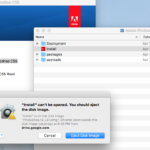
Mac High Sierra : Adobe CS5 – install” can’t be opened. you should eject the disk image.
I was trying to install Adobe CS5 in my Imac 2011 – running High Sierra. When i clicked on the installation icon, i always got “install” can’t be opened....
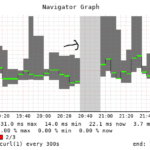
Smokeping – big “gap” when restarting
Smokeping is a great tool for network monitoring, we recently adopted smokeping to use it for URL monitoring. We use the Curl probe for this purpose. Everything seems working...
Mitmproxy – how to capture SSL traffic
Mitmproxy is a python proxy, it’s very light. Basically it’s like a normal proxy but it offers some advanced features that most developer/ hacker like to have: – Watching...
tls v1.0 v1.1 v1.2 – how to check which tls version your server support?
nmap –script ssl-enum-ciphers -p 443 you can test your script to see the difference. Here are some url that only support a specific tls version. This subdomain and...
Convert PFX to PEM
$pfx_file=""; $password="dailyithlep"; $pem_file=""; convert_pfx_file_to_pem($pfx_file,$password,$pem_file,true); function convert_pfx_file_to_pem($pfx_file,$password,$pem_file,$remove_password=true) { $CERT_FILE="/"; $CA_CERT_FILE="/"; $PRIVATE_KEY="/"; $PRIVATE_KEY_NOPASSWORD="/"; //get the certificate file from pfx file $cmd=”openssl pkcs12 -clcerts -nokeys -in \”$pfx_file\” -out $CERT_FILE -passin pass:$password”; shell_exec($cmd);...
Smokeping – Curl vs AnotherCurl
Curl can provide us the following time report: time_namelookup time_redirect time_connect time_appconnect time_pretransfer time_starttransfer time_total To get these report time, you need to use the option -w , here...
Linux: cronjob
When you setup a cronjob file (/) , the file should include the path below: PATH=/usr/local/sbin:/usr/local/bin:/sbin:/bin:/usr/sbin:/usr/bin:/root/bin:/root/bin this is because if you don’t set the path, some command might not...
Linux: send all error to another program (PIPE)
You can use the option : 2>&1 for this purpose. 2>&1 |
PHP : HTTP Post with Curl
A sample function to use curl post data. $data=array() $data=array(); $data=”hello world”; $data=”hello user”; curl_post($url,$data) function curl_post($url,$fields) { //open connection $ch = curl_init(); //set the url, number of POST...